Limited Flexibility Accommodations
Limited flexibility accommodations are designed to address the impact of a brief, intermittent, and unpredictable disability-related flare that interferes with course activities.
On this Page
About Limited Flexibility
Some chronic health conditions (e.g. migraine or inflammatory bowel disease) and psychiatric conditions (e.g. panic disorder and bipolar disorder) have symptoms that are unpredictable or episodic in nature. Symptom flare-ups impact daily functioning and may occasionally and unpredictably cause a student to miss a class, be unable to complete an exam on a given day, or be unable to submit an assignment on the due date. Limited flexibility accommodations provide a small amount of flexibility, giving students the opportunity to meet essential course objectives while also managing the symptoms of the disability.
When students request a limited flexibility accommodation, instructors must either create a Limited Flexibility Plan by filling out a questionnaire in the Instructor Portal or reuse a plan from a previous semester. The plan is specific to the section of the course (e.g. lecture, lab, discussion), because the flexibility that is reasonable in a lecture may not be the same as in lab or discussion, and should be completed by the instructor of record for that course section.
For consistency across discussion or lab sections taught by different teaching assistants, it may be helpful to define limited flexibility plans in advance as an instructional team using this Microsoft Word version of the questionnaire and then copy information into the Limited Flexibility Plan for specific sections.
The limited flexibility plan is used only in the case of a student experiencing a disability-related flare. They may not need it, but if they do, there is already an established plan.
Once completed, the plan is used with any students in that course section who have requested or will request a limited flexibility accommodation.
Students select accommodations separately for each course section (e.g. lecture, lab, discussion). They may choose to use the flexibility accommodation in certain sections or in all sections.
Step-by-Step Guide to Creating a Limited Flexibility Plan
Note: You will complete a questionnaire that will time out after 15 minutes of inactivity and require you to start over. If you would like more time to work on the questionnaire, please use this Microsoft Word version to write your responses and then paste them into the online questionnaire.
Step One
Log in to the Instructor Portal (NetID required).
Step Two
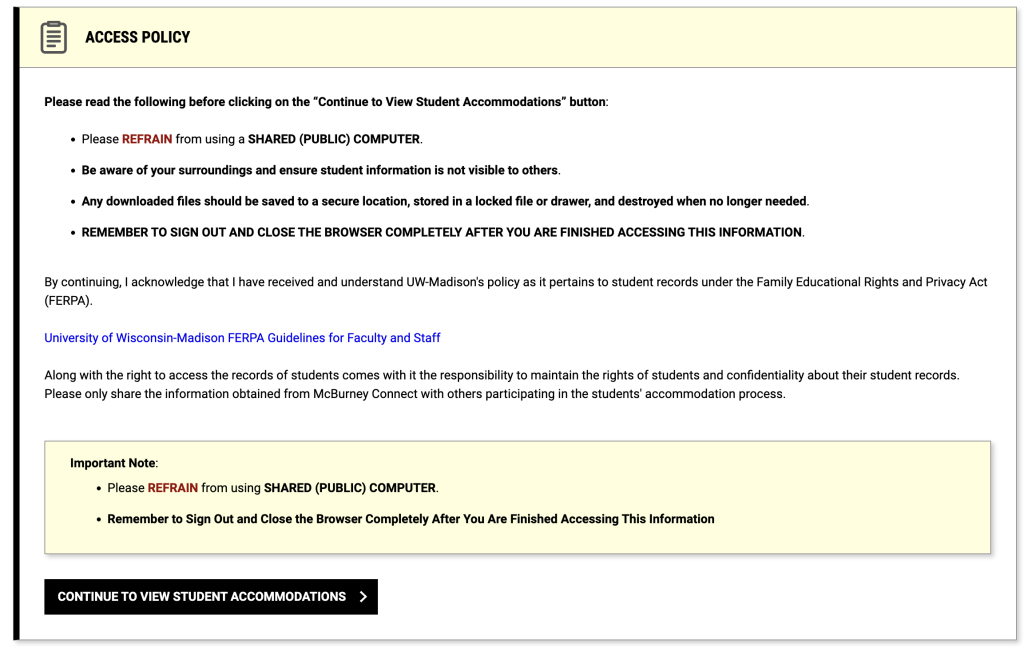
Review the Access Policy and select the button [Continue to View Student Accommodations].
Step Three
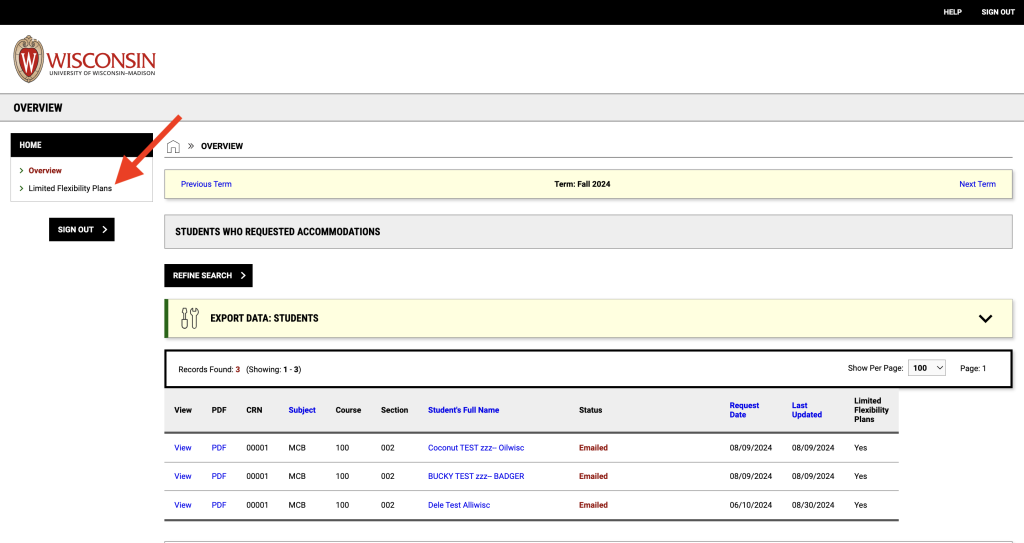
In the left-hand menu list, select “Limited Flexibility Plans.”
Step Four
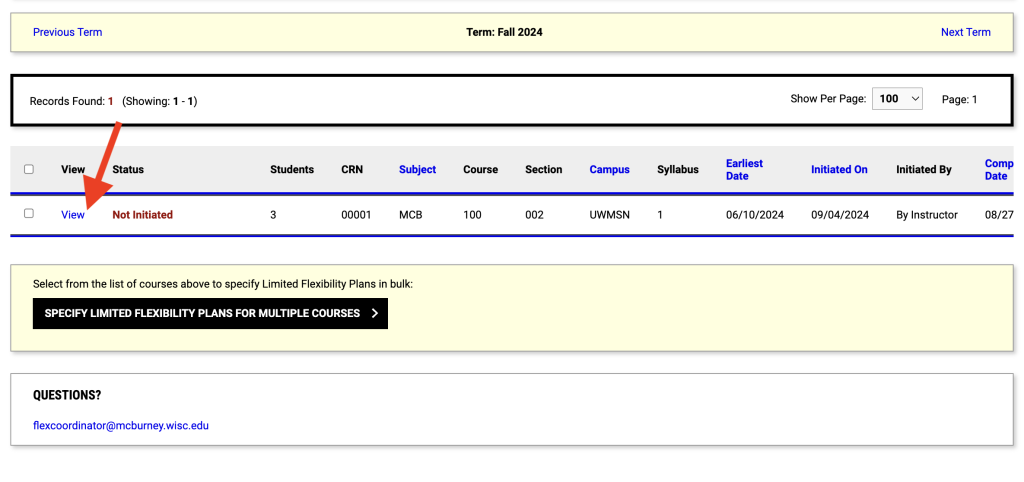
In the section “Step 1: Select Courses,” check the box(es) to select the course section(s) for which you wish to complete the Limited Flexibility Plan Questionnaire. Note: You may select multiple courses if the expectations and the Limited Flexibility Plan will be the same.
Step Five
In the section “Step 2: Select Available Options,” you will be able to select whether to apply a new plan to multiple course sections or to re-use a plan from another course within the previous four semesters. If you select multiple course sections, click the button [Specify Limited Flexibility Plans for Multiple Courses]. This allows you to complete one new Limited Flexibility Plan for all selected course sections in your list. If you want to re-use a plan, select the option to copy a previous Limited Flexibility Plan from another course.
Step Six
Complete the questionnaire, providing clear and defined answers to each question. View example responses.
McBurney Center staff will review your plan and either a) mark it as completed, so that the plan becomes available to the student(s) to view or b) contact you to edit or clarify the plan. Depending upon the time of semester, this may take up to 5 business days.
Tips
Consider reasonable limits for the course: How many class meetings might a student miss and still learn and engage with the course work? How can a student have alternative opportunities to get course material, participate, demonstrate knowledge and submit work if occasionally/infrequently unable to attend? How many days is reasonable for a student to reschedule a missed exam, quiz or assignment deadline without compromising their learning, the grading process or the experiences of others?
You may select from pre-defined responses or select “other” and customize your response to the unique expectation of the course. Keep in mind that this is a course plan, not a plan for a specific student. Do not use student names or identifying information.
Avoid leaving questions open-ended and asking students to reach out to figure out a plan while they are experiencing a flare. It is reasonable to expect students to notify instructors if a flare occurs, but it is not appropriate to ask them to negotiate flexibility terms while they are managing their symptoms. Providing a detailed plan in advance will give students clarity on how they can participate in the course during and after the flare-up.
Frequently Asked Questions
As soon as possible after a student has requested a limited flexibility accommodation. Completing the plan promptly is important to provide clarity to students. You do not need to meet with the student(s) making the request before you complete the plan. It may be helpful to meet with the student(s) once the plan is completed to discuss it.
Yes – when a student requests limited flexibility in a course, the instructor must create a Limited Flexibility Plan. The questionnaire in the Instructor Portal is a helpful tool for creating this plan, guiding instructors in setting clear limits. Once completed, it is stored and available for any student requesting limited flexibility in the course. However, if an instructor is unable to use the questionnaire, they may outline the flexibility parameters in a separate Limited Flexibility Plan document and share it with the student and student’s McBurney Center Access Consultant.
Instructors only need to complete a Limited Flexibility Plan once per course section (e.g. lecture, lab, discussion), no matter how many students in that course section request limited flexibility accommodations.
If you receive multiple Student Accommodation Letters for the same section of a course, you do not need to complete the plan again. However, if you receive a Student Accommodation Letter for a different section (either of the same course or a different course), you must complete a Limited Flexibility Plan for that section or re-use a plan from a previous semester. If a member of your teaching team (for example, a teaching assistant who teaches a different section of the course) receives a Student Accommodation Letter for their section, they must complete a Limited Flexibility Plan for that section.
Please email the Flexibility Coordinator and state the course (name/number) you wish to edit and the information that should be edited. The Flexibility Coordinator can edit on your behalf or you may request to edit it yourself.